Remote control waits for your directional commands. Follow mode continuously estimates the handset’s position and adjusts the cart to maintain a designed relationship with you. Neither system chooses a safe route on its own.
A remote-control electric cart waits for instructions. You press forward, left, right, reverse or stop, and the cart translates those commands into motor output. Its electronics may help it hold a line or control its downhill speed, but you still choose the route.
A follow-me cart does something more continuous. It treats the handset on your belt or in your back pocket as a moving reference point. The cart repeatedly estimates its position relative to that handset and adjusts its left and right motors to remain within a designed following zone.
That does not make follow mode autonomous. A beacon-based cart does not necessarily see a bridge edge, bunker, pond, person or parked vehicle. It follows a signal and a control rule. The golfer still has to choose where follow mode is appropriate and switch to remote or manual control when the environment becomes constrained.
How remote-control electric carts work
1. The handset sends an instruction
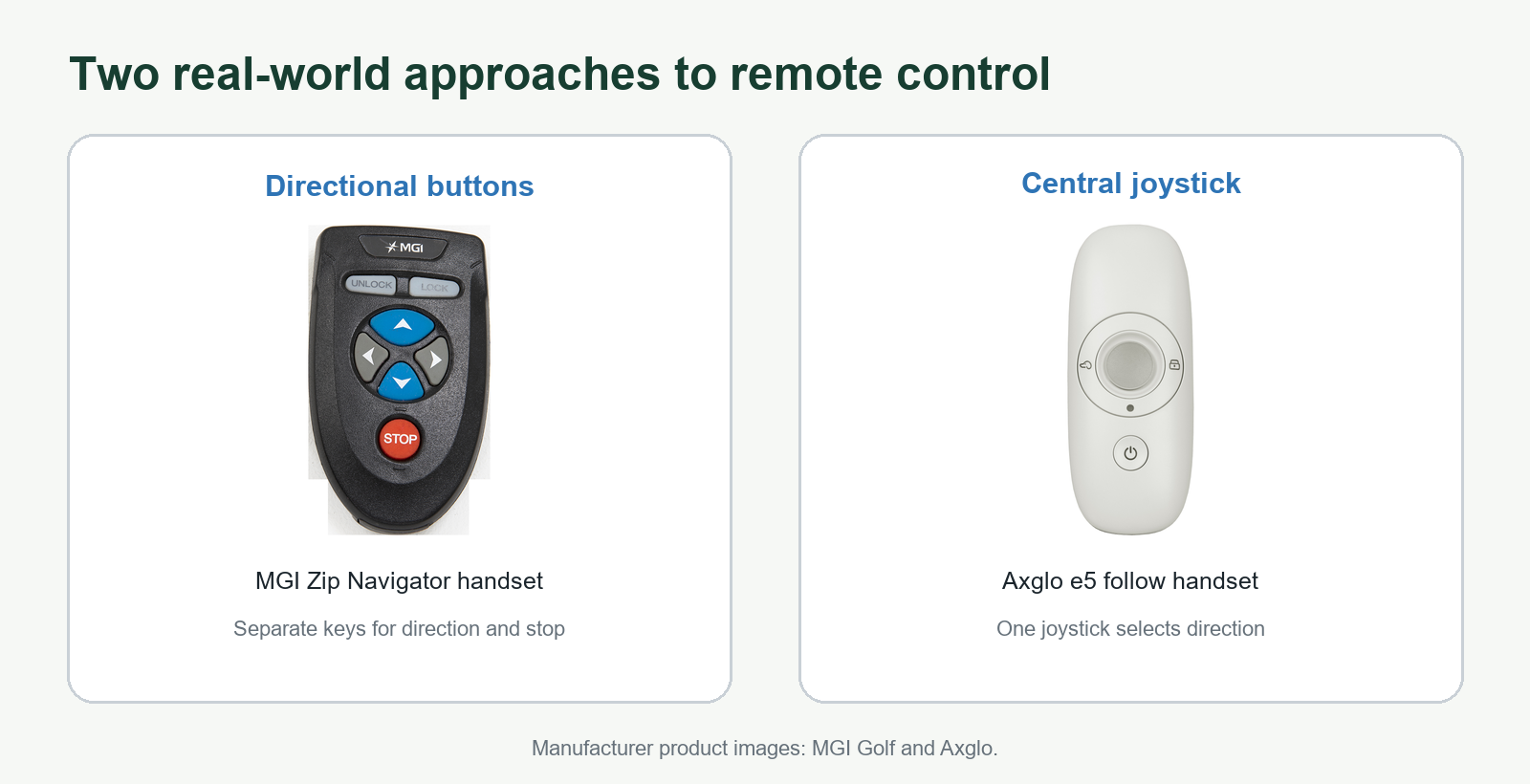
A paired wireless handset sends a command to the cart’s receiver. MGI, Motocaddy and Stewart use separate directional buttons on the examples in this guide. Axglo documents a different layout on the e5: a central joystick selects direction, while a separate control activates follow mode.[6]
In either layout, the command is intentional and discrete: turn left now, increase speed, pause, reverse or stop.
What kind of wireless link is it?
Manufacturers do not disclose this consistently. Stewart explicitly describes the Q Follow handset as Bluetooth-connected. Axglo says its phone app connects to the e5 through Bluetooth, but its product guide does not clearly say that the dedicated remote-to-cart link uses the same protocol. The current MGI Zip Navigator manual describes pairing and range without naming Bluetooth, Wi-Fi or a frequency band. Motocaddy’s M7 manual warns that radio-frequency interference can affect range, but it also does not identify the handset protocol.[1][2][4][6]
Bluetooth elsewhere on the cart does not tell us what protocol the handheld remote uses. Unless the manufacturer names the remote protocol, the accurate description is simply a paired wireless or radio link.
Published range is a ceiling, not a working distance
Current manufacturer claims illustrate how long these links can be under suitable conditions:
- MGI Zip Navigator: 100–200 meters in the current owner manual; MGI says weather, the environment and electromagnetic interference can affect it.[1]
- Motocaddy M7 Remote: more than 100 yards on the current product page.[2]
- Stewart Golf Q Follow: 75 meters on the current product page.[4]
These numbers describe communication capability, not a recommended separation. At 100 yards, small hazards and changes in slope are harder to judge, stopping distance still exists, and another golfer can enter the cart’s path. Keep the cart in sight, choose a clear line and operate close enough to intervene.
Golf Unpacked’s publisher has controlled an MGI Zip Navigator from more than 100 yards away on an open course and found the reach useful. The maximum distance was not measured under controlled conditions. The observation is consistent with MGI’s published range, but it does not independently verify the 100–200 meter claim.
2. The controller turns that instruction into wheel behavior
Remote carts commonly use independently driven rear wheels. To turn, the controller changes the relative output of the two motors. A small difference produces a gentle correction; a larger difference produces a tighter turn. The exact control logic is proprietary, but the practical result is differential steering rather than a golfer physically turning the handle.
What does frequent steering do to battery range?
The radio commands themselves are not the meaningful load on the cart’s main battery. The traction motors do the energy-intensive work. The reviewed manufacturers do not publish controlled remote-versus-follow consumption figures, and command count would be a poor proxy anyway: one long correction, many small corrections and a turn on a slope can require very different motor output.
The handset’s own energy use is small by comparison and is normally supplied by a separate rechargeable battery. The practical battery penalty comes indirectly if a control style creates more stop-start motion, tighter turns, wheel scrub or a longer route. Follow mode can make many automatic corrections; remote control can make fewer but larger corrections. Neither pattern is inherently more efficient on every course.
Assume a 15kg cart carrying a 15kg loaded bag and accessories, for 30kg total, moving at 1.5m/s. Accelerating that mass from rest stores about 0.009Wh of kinetic energy. Even allowing for only 50% motor-and-controller efficiency, 100 additional full stop-start cycles would use roughly 2Wh—about 0.5% of a 380Wh battery.
Actual cart and bag weights vary. This simplified estimate excludes rolling resistance during acceleration and does not model hills. A route that is 10% longer can add about 10% to its distance-related rolling-energy component, so terrain and path choice usually matter more than the number of button presses.
3. Stability systems correct motion, not destination
Extra sensors can make the cart easier to manage. MGI says the Zip Navigator uses Gyroscope Straight Tracker technology to maintain its heading and downhill speed control to regulate descents. Its published specification also lists twin 230-watt motors.[1]
Motocaddy’s M7 Remote combines directional handset control with Downhill Control and Adaptive Terrain Stability. Motocaddy describes the current model as supporting forward, left, right and reverse navigation, plus pause, resume and emergency stop functions.[2]
These systems reduce correction work, but they do not select a safe path. A gyro can resist unintended drift; it cannot decide whether the cart should cross a narrow bridge or avoid a bunker.
Remote-control examples
MGI Zip Navigator. A full-direction remote cart with gyroscopic straight tracking, downhill speed control and twin motors. It illustrates how a remote cart can add stabilization without becoming a follow cart.
Motocaddy M7 Remote. A remote cart with forward, reverse and steering commands, automatic downhill control, terrain-stability assistance and manual handle control. Its remote specification emphasizes operating range, but the useful feature is the ability to switch control modes as the course changes.
Stewart Golf VERTX Remote. A remote-only example from a company that also sells follow carts. Stewart positions its Active Terrain Control system as a way to regulate speed across climbs and descents while the golfer remains responsible for steering.[3]
How follow-me electric carts work
1. The handset becomes the moving reference
Most follow systems described in current golf-cart manuals still depend on a dedicated handset. The golfer wears or carries it in a specified position, commonly on a belt or in a back pocket. The system uses that signal to judge where the cart should be relative to the golfer.
The sensing method is not identical across every brand, and manufacturers do not always publish the full implementation. Stewart identifies a Bluetooth handset and describes antennas near the rear motors. Axglo instructs users to place the e5 remote in a back pocket for stronger follow connectivity, while its app uses Bluetooth. BATCADDY publishes follow distances but does not identify the radio protocol in the reviewed manual. It is therefore safer to evaluate each manual than to assume that every product uses the same radio, antenna geometry or software.[4][5][6]
2. The cart manages active and stopping zones
Stewart Golf provides one of the clearest explanations. On the Q Follow, antennas near the rear wheels create a neutral zone and an active zone. The cart remains stationary when the handset is in the neutral zone, approximately one meter from the cart. When the handset moves into the active zone, approximately one to three meters away, the controller independently adjusts the rear motors to match the golfer’s movement.[4]
Distance alone is not enough to steer. The controller must also derive enough directional information to determine whether the handset has moved left or right of the cart’s current heading. Stewart describes two rear antennas and independent motor adjustment, but it does not disclose the exact positioning algorithm. The figure therefore shows the control requirement—range plus bearing—without claiming a specific calculation method.[4]
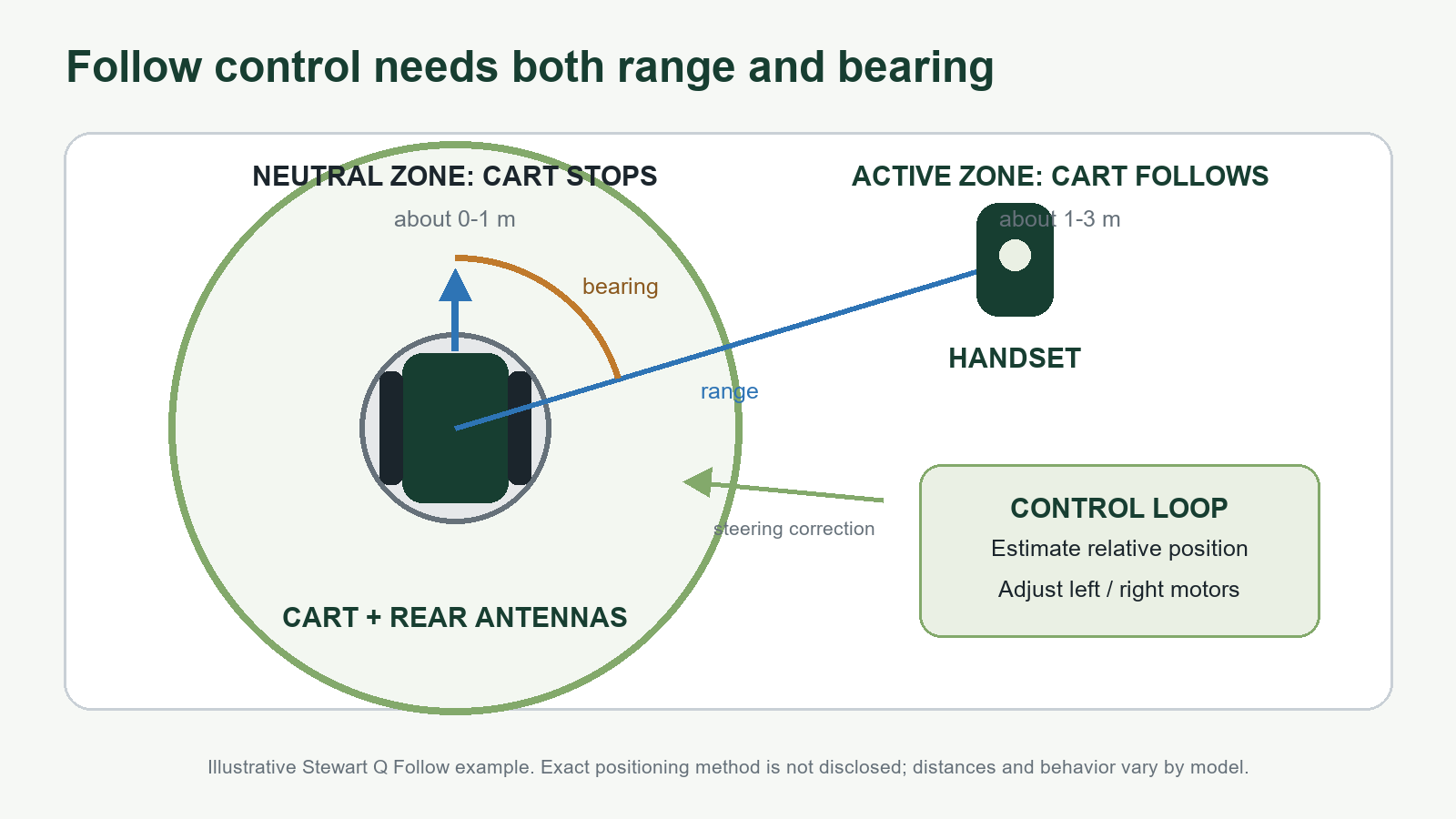
BATCADDY publishes different thresholds for the EVO II Follow: it starts when the handset is more than three meters away, stops within 2.5 meters, warns beyond seven meters and stops again beyond ten meters. Those numbers show why follow behavior should be learned from the model’s manual rather than treated as a universal standard.[5]
3. Follow mode is a feedback loop
The control system is continuously comparing the cart’s current relationship to the handset with its target relationship. If the golfer moves farther away, the cart accelerates. If the golfer slows or stops, the cart closes the gap and stops inside its neutral range. Steering comes from changing left and right motor output as the handset’s direction changes.
This is the fundamental difference from remote control. In remote mode, the golfer observes the cart and sends corrections. In follow mode, the electronics observe the handset relationship and generate many of those corrections automatically.
Follow-me examples
Stewart Golf Q Follow. A Bluetooth-connected follow cart with defined active and neutral zones. It also includes remote control, which matters because Stewart’s owner manual limits follow mode mainly to open, flat fairways.[4]
Axglo e5. A hybrid cart offering follow, remote, remote-cruise, power-assisted and manual-push modes. Axglo instructs users to keep the remote in a back pocket for follow mode and allows follow distance and angle settings through its app.[6]
BATCADDY EVO II Follow. Another hybrid design with follow, remote, walk-along and manual-push modes. Its manual is useful because it publishes operating distances and warns against tight turns and sudden changes while following.[5]
Remote control versus follow mode
| Decision point | Remote control | Follow mode |
|---|---|---|
| Who steers? | The golfer sends each directional command. | The controller steers toward a target relationship with the handset. |
| Best environment | Deliberate routing, changing lines and constrained areas. | Open fairways with predictable walking lines. |
| Attention demand | Requires repeated observation and input. | Reduces continuous steering input, but still requires supervision. |
| Cart position | Where the golfer commands it to go; often ahead or to the side. | Usually behind or beside the golfer, depending on the system. |
| Tight spaces | More direct control, though manual mode may still be safest. | Usually requires switching to remote or manual control. |
| Signal loss | Safe behavior depends on the model’s stop and timeout logic. | May warn, stop or lose the follow relationship; check the manual. |
| Main trade-off | More active control for more deliberate placement. | More natural walking for more mode management and system dependence. |
This is a functional synthesis of the cited owner manuals and specifications, not a hands-on ranking.
The strongest case for remote control
Remote control is strongest when intentional placement matters more than hands-free walking. It lets you send the bag toward a chosen side of the fairway, bring it toward the next tee or guide it through a changing line without asking the cart to infer your route.
It also makes the control relationship easy to understand: the cart moves because you told it to move. That can be reassuring near other golfers, path edges and obstacles, provided you keep the cart within sight and operate at an appropriate distance and speed.
The trade-off is attention. Every correction is another small task. You have to watch the cart, manage the handset and anticipate its stopping distance while also walking, talking and preparing for the next shot. Remote operation removes pushing effort; it does not remove responsibility for driving.
The strongest case for follow mode
Follow mode is strongest when the course gives the system room to work. On an open fairway, the golfer can walk a natural line while the bag maintains a designed distance behind or beside them. The cart responds to changes in pace without repeated directional button presses.
That can make walking feel less like operating equipment. It can also keep the bag near the golfer rather than requiring repeated send-ahead and retrieve commands.
The trade-off is mode discipline. Stewart’s Q Follow manual says follow mode is good for open, flat fairways and not for car parks, paths, bridges, steep hills, areas around greens, water or other obstacles. BATCADDY similarly warns that tight areas, sudden turns and excessive separation can disrupt follow behavior.[4][5]
Those warnings are not footnotes to ignore; they define the intended operating envelope. A golfer who expects to use follow mode everywhere may be disappointed. A golfer willing to switch between follow, remote and manual control is using the technology the way the manuals describe it.
What follow mode does not guarantee
- Obstacle detection. Do not assume the cart can identify people, curbs, bunkers, water or bridge edges unless the exact model explicitly documents that capability.
- Safe operation at maximum radio range. Connection range is a communications specification, not a recommended working distance.
- Identical behavior across brands. Follow distances, warning thresholds, turning response and handset placement vary.
- Hands-off responsibility. The golfer remains responsible for choosing the mode, monitoring the cart and stopping it when conditions change.
Which system fits which golfer?
Choose remote control first if your home course has narrow bridges, steep side slopes, crowded paths, sharp transitions or water close to common walking lines. It is also the simpler choice if you prefer to keep the cart in front of you and are comfortable steering it throughout the round.
Consider follow mode if most of your walking happens on broad fairways and your priority is reducing repeated handset input. The benefit is greatest for golfers who are comfortable treating follow as one mode among several, not as an always-on autopilot.
A hybrid follow-and-remote cart offers the broadest control envelope. Follow can handle the open fairway; remote can take over near greens, bridges and other constrained areas. The cost is more system complexity, more behavior to learn and usually more dependence on the handset.
What to verify before buying
Bottom line
Remote control gives the golfer direct authority over the cart’s line. Follow mode automates the continuous job of maintaining position relative to the golfer. Neither removes the need to supervise the cart, and neither is universally better.
The useful question is not simply, “Do I want remote or follow?” It is, “Where on my course can the cart safely make corrections for me, and where do I want to make every correction myself?” Once the course and the control handoffs are clear, the product choice becomes much easier.
Sources and evidence notes
All sources below are first-party manufacturer pages or owner manuals checked August 31, 2026. Product claims are reported as manufacturer specifications, not independently verified performance.